摘要
1) 一句话总结 作者在5天内利用Codex,通过构建外部记忆系统和自动化测试修复循环,成功将丢失源码的Electron应用从编译后的混淆文件逆向恢复为可运行的TypeScript源代码。
2) 关键要点
- 项目背景:作者丢失了Electron画图应用的源码,仅剩包含混淆代码的
asar编译文件,决定尝试用Codex进行逆向工程。 - 结构重建:Codex成功分析了混淆且不可读的JS文件,根据代码结构和逻辑模式重建了完整的模块清单,并将其作为转换为TypeScript的进度检查表。
- 指令干预:为防止Codex为了让代码成功编译而擅自省略“非必要”代码,作者在
AGENT.md中设定了严格规则:“逐个恢复模块,不要顾虑代码能否编译”。 - 外部记忆系统:为解决上下文窗口限制,作者建立了由
AGENT.md(任务背景与规则)和PLAN.md(进度追踪)组成的外部记忆系统,每次工作后自动更新进度。 - 自动化接续:作者编写了脚本,在上下文即将满载时自动开启新会话并输入“continue”,让Codex根据
PLAN.md无缝接续工作。 - 组装与自动修复:代码恢复后,使用Electron Forge脚手架进行组装,并让Codex进入“编译-运行
npm start-跑集成测试-修复Bug”的自动循环。 - 核心经验:处理长周期任务时,必须提供计划清单(避免上下文断裂导致工作白费)、验证手段(让AI能自我纠错),并明确告知AI“不要做什么”。
3) 风险与不足(原文明确提及)
- 缺乏内置长任务循环机制:Codex没有内置类似ralph-loop的外部循环插件,处理长任务时上下文容易耗尽,必须依赖外部脚本定期开启新会话。
- AI的“编译执念”风险:Codex天生倾向于生成能立即运行的代码,在逆向恢复场景下,这种特性会导致它悄悄跳过部分代码,造成恢复不完整。
- 恢复结果并非100%完美:虽然核心功能和代码结构得以恢复且可再次修改,但最终版本仍存在一些运行时Bug,部分边缘用例的表现与原版存在微小差异。
正文
Ever lost your source code? It’s a terrible feeling. Years ago, I built an Electron drawing app. Then I lost the source code. All I had left was the compiled version.
I thought about rewriting it from scratch, but the idea of recreating all those little details felt overwhelming. Then I read OpenAI’s blog post about building the Sora Android app in 28 days with Codex, and I had an idea: the compiled code was still there. Could I get Codex to reverse-engineer it back into source code?
Five days later, I had working TypeScript source code. Here’s how it happened.
- Extracting Module Structure from Obfuscated Code
Electron apps bundle everything into an asar file. Step one was getting Codex to extract the JS and CSS files from it.
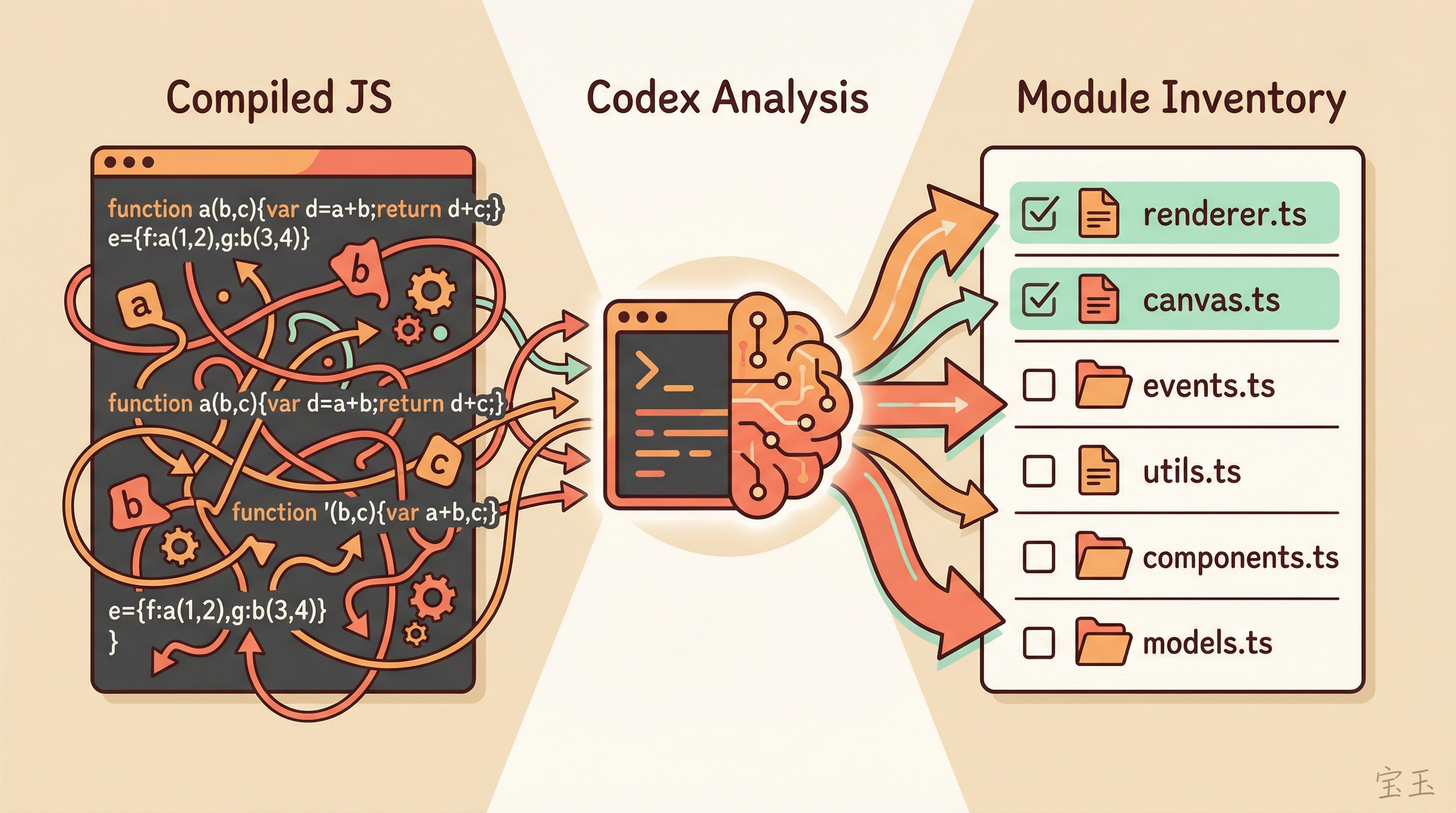
The extracted JavaScript was compiled and obfuscated. Variable names like a, b, c. Function calls tangled into unreadable chains. A human would get dizzy looking at it. But for Codex, it was just another piece of code to analyze.
I asked Codex to analyze the main JS files and list out the modules. It actually did it. The original module names were gone, but from the code structure and logic patterns, Codex reconstructed a fairly complete module inventory.
With that inventory, I had Codex create a restoration plan: convert each module from obfuscated JavaScript back into readable TypeScript. The module list became a checklist. Every completed module got a checkmark.
- First Problem: Codex Wanted to “Prove” the Code Worked
Early in the restoration process, I hit a snag.
Codex has this instinct: it really wants to verify that generated code actually runs. To make the code build successfully, it would quietly skip parts it deemed “not immediately necessary.”
For writing new code, that’s a good habit. For restoring old code, it’s a disaster. I needed complete restoration, not a minimal subset that compiles.
The fix was simple. I added a strict rule to AGENT.md:
“Restore modules one by one. Do not worry about making the code compile.”
That single line changed everything. Codex stopped obsessing over build errors and started faithfully restoring module by module.
- Second Problem: Context Fills Up, Memory Disappears
Codex has a limited context window. Back then, it would stop after running for a while, and I’d have to keep typing “continue.” If I started a new session, I’d have to explain the whole task again.
The problem: a new Codex session doesn’t know what happened before. You have to re-explain the entire background.
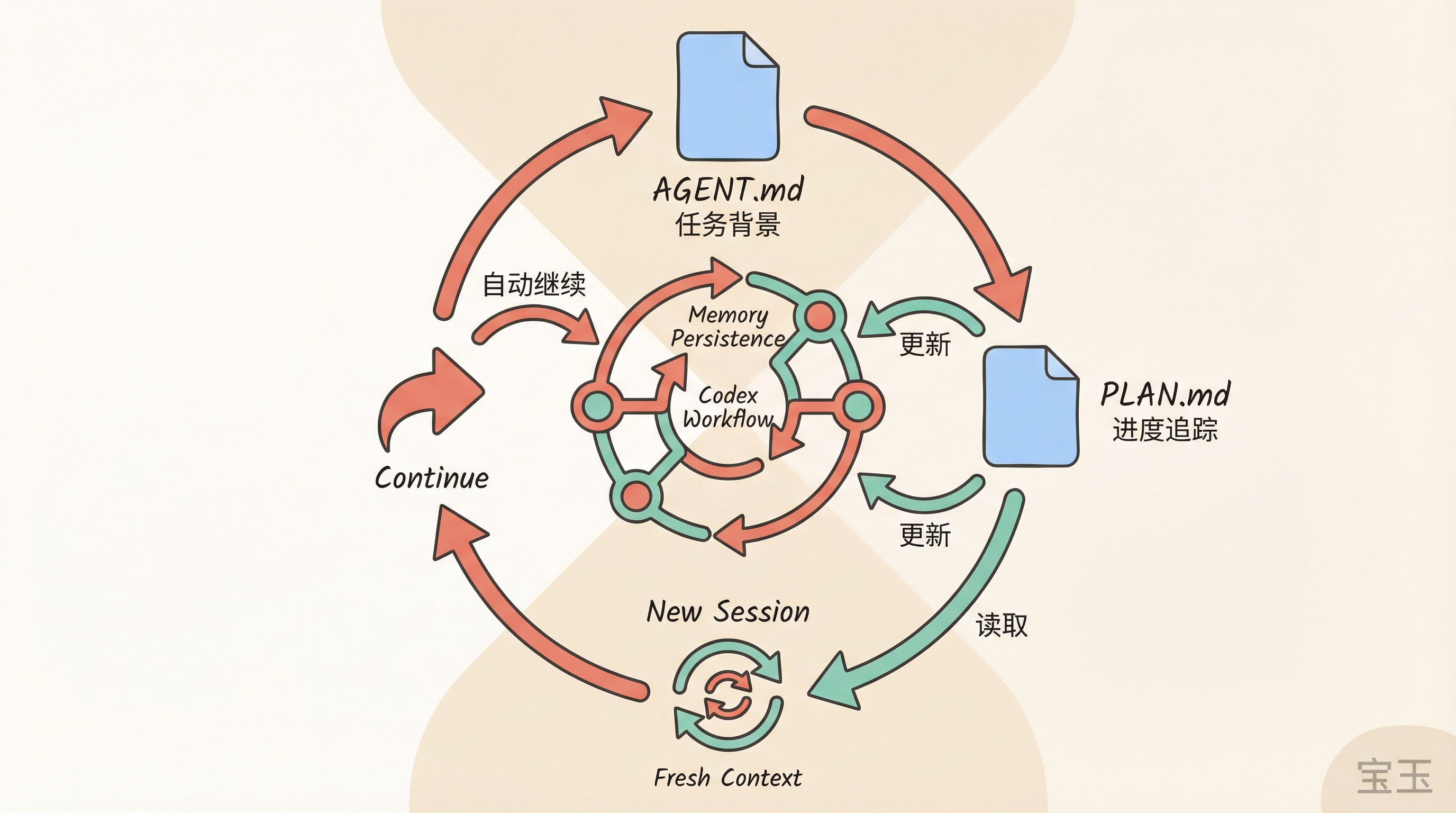
My solution was to build an “external memory” system:
- Describe the overall task background in
AGENT.md - Create a
PLAN.mdfile to track the restoration plan and current progress - Add a rule to
AGENT.md: always readPLAN.mdfirst, and updatePLAN.mdafter each work session
This way, every new session just needed “continue” as input. Codex would automatically read the progress file and pick up where it left off.
Eventually, I got tired of even doing that manually. I had Codex write a script that detected when context was getting full, automatically started a new session, and typed “continue.”
So I just watched it run. Check back every now and then, and a few more modules were done.
- Assembling the Pieces into a Working App
A few days later, all modules had been restored to TypeScript files. But these were still scattered parts.
Next step: assemble them into an actual working Electron app. I had Codex create a new project using Electron Forge scaffolding, then drop the restored code in.
At this point, I rewrote AGENT.md and PLAN.md to explain how to compile and test. Then the same routine: automatic new sessions, continue, update PLAN.
What happened next was almost magical.
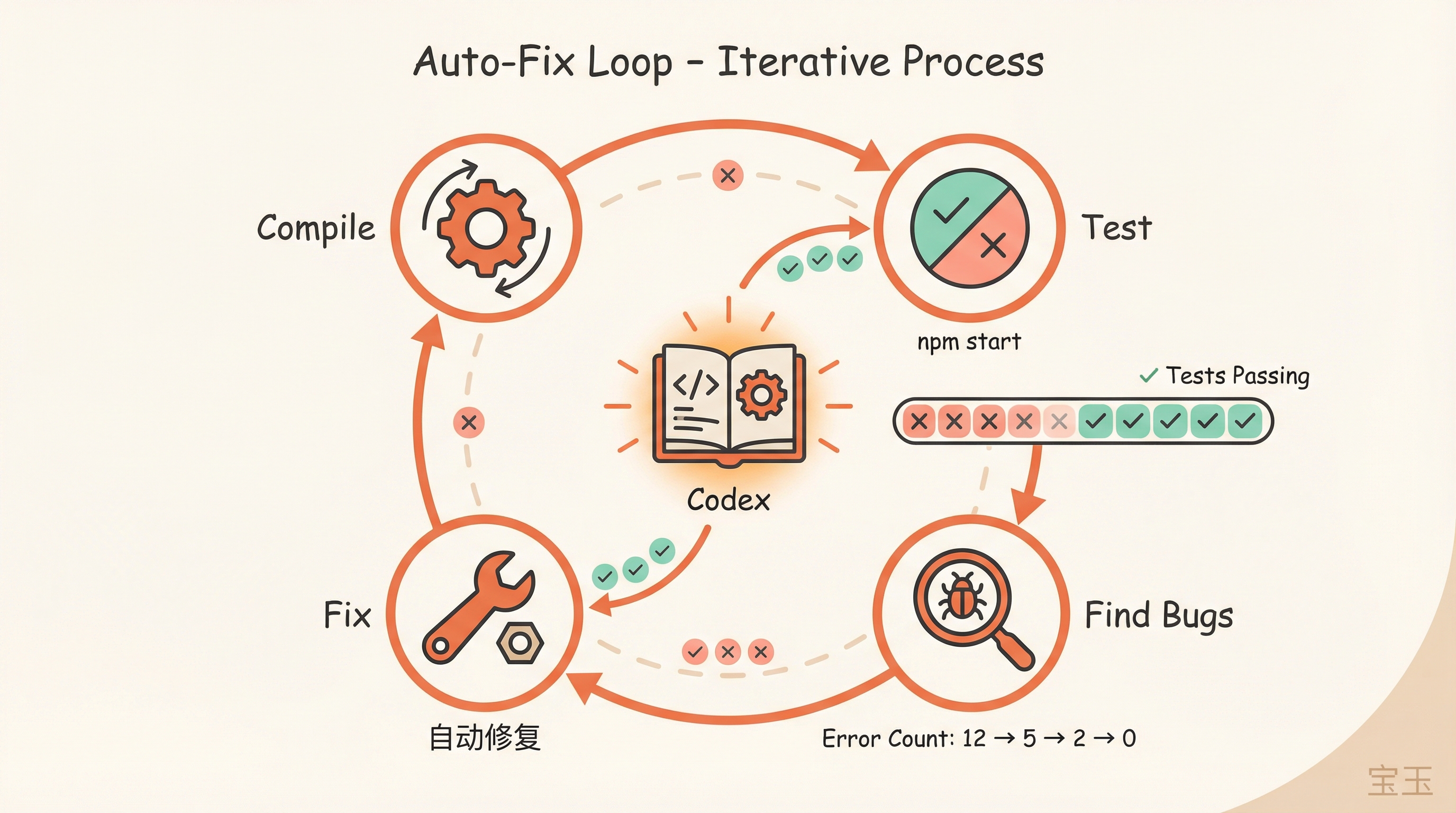
I watched Codex continuously fix compilation errors. It would check the original compiled code to verify logic, run npm start to test the app, find problems, fix them, move on.
Once the modules mostly compiled, I worked with Codex to write integration tests covering the main user flows. After the tests were ready, it was the same loop: let Codex generate code, run tests, fix issues.
- Five Days Later
By the end of day five, I had an Electron app with complete source code that actually ran.
“Perfect restoration” would be an overstatement. There were still some runtime bugs. Some edge-case features behaved slightly differently than before. But the main functionality was there, the structure was clean, and most importantly, I could finally modify the code again.
- What I Learned
A lot of people say Codex doesn’t need an external loop mechanism. I think that’s wrong.
For long-running tasks, Codex needs something like a ralph-loop plugin. Otherwise, you end up like me, writing your own script to periodically start new sessions and type “continue.” This should be a built-in feature.
A few other lessons:
Plan and checklist are critical for long tasks. You must update progress after each work session. If context breaks and progress isn’t saved, previous work is wasted.
Giving Codex a way to verify is equally important. The only reason it could auto-fix bugs was because it could run npm start to see results and run tests to check correctness. Without verification, Codex can only write blind.
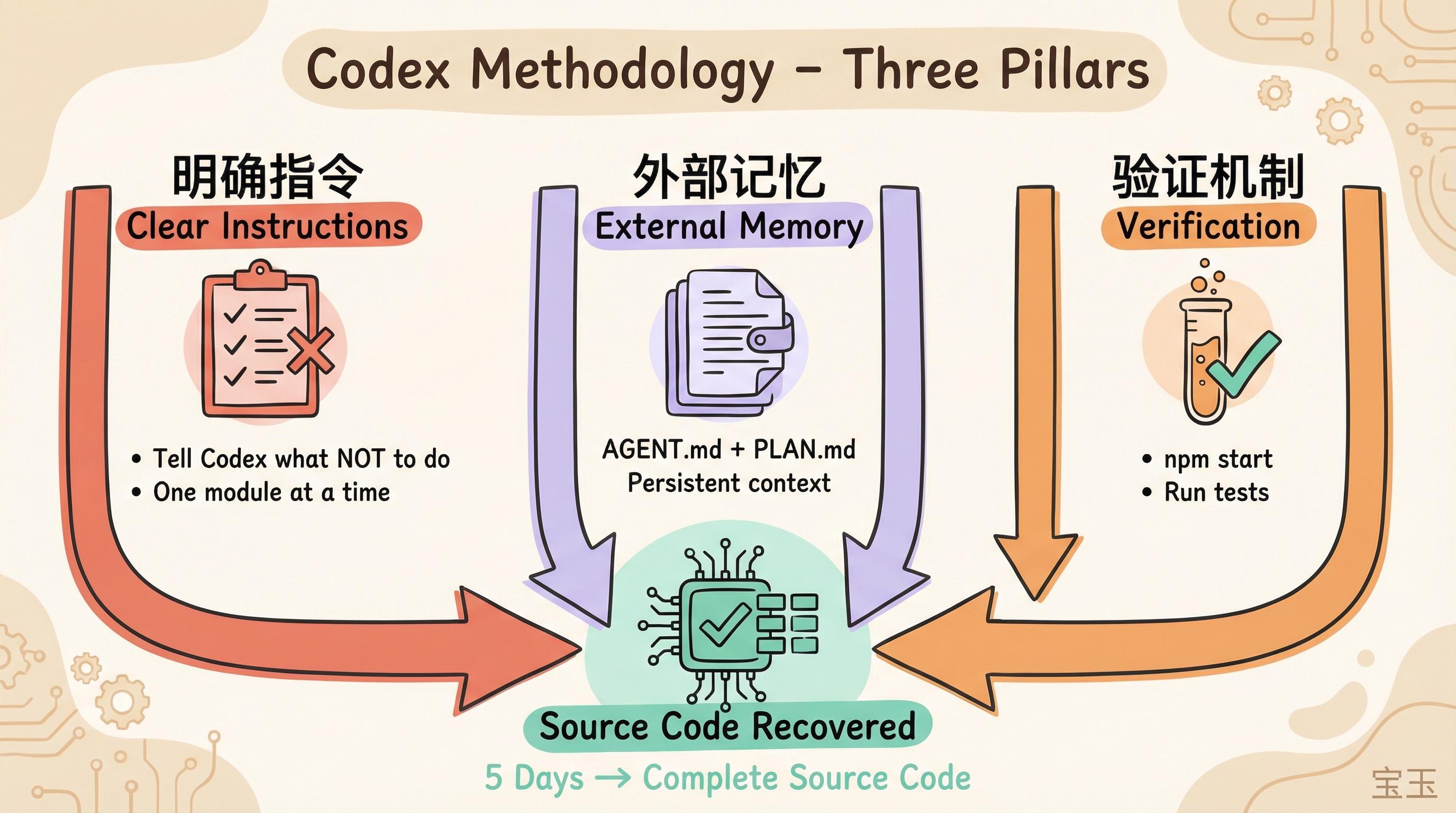
Sometimes you need to tell Codex what NOT to do. That rule about not worrying about compilation freed Codex to focus on what actually mattered.
OpenAI’s blog post was about using Codex to build a production app from scratch in 28 days. My story is the opposite: using Codex to reverse-engineer a lost codebase back into source code in 5 days.
Different directions, but the same core methodology: treat Codex as a highly capable teammate who needs clear instructions, build an external memory system to maintain continuity, and provide verification methods so it can self-correct.